
Listen to this article
Audio version available
The quality of AI-generated images depends almost entirely on how well you communicate your vision through written prompts. Many creators struggle with AI image generators not because the technology is limited, but because they haven't learned the language that produces consistent, high-quality results. Understanding prompt structure transforms AI image generation from a frustrating guessing game into a precise creative tool that delivers exactly what you imagine. Whether you're creating marketing materials, concept art, or personal projects, mastering prompt writing unlocks the full potential of AI image technology. This guide will teach you the essential techniques that separate amateur attempts from professional-quality AI-generated visuals.
Table of Contents
- Understanding AI Image Prompts
- Essential Components of Effective Prompts
- The Power of Specificity
- Mastering Style and Mood
- Technical Details That Transform Results
- Common Mistakes to Avoid
- Refining Your Prompts Through Iteration
- Start Creating Professional AI Images
Understanding AI Image Prompts
An AI image prompt is simply a text description that tells the generator what visual content you want to create, serving as the communication bridge between your creative vision and the AI's output capabilities. The AI cannot read your mind or infer context beyond what you explicitly state, which means every detail you include directly influences the final result. Modern AI image generators have become incredibly sophisticated at interpreting language, but they still rely completely on the clarity and precision of your written instructions. Think of prompt writing as directing a highly skilled artist who can execute any style perfectly but needs specific guidance about composition, mood, lighting, and subject matter. The difference between a vague prompt like "a cat" and a detailed one like "a fluffy white Persian cat with blue eyes sitting on a velvet cushion in golden afternoon light" determines whether you get a generic image or something that matches your exact vision.
Essential Components of Effective Prompts
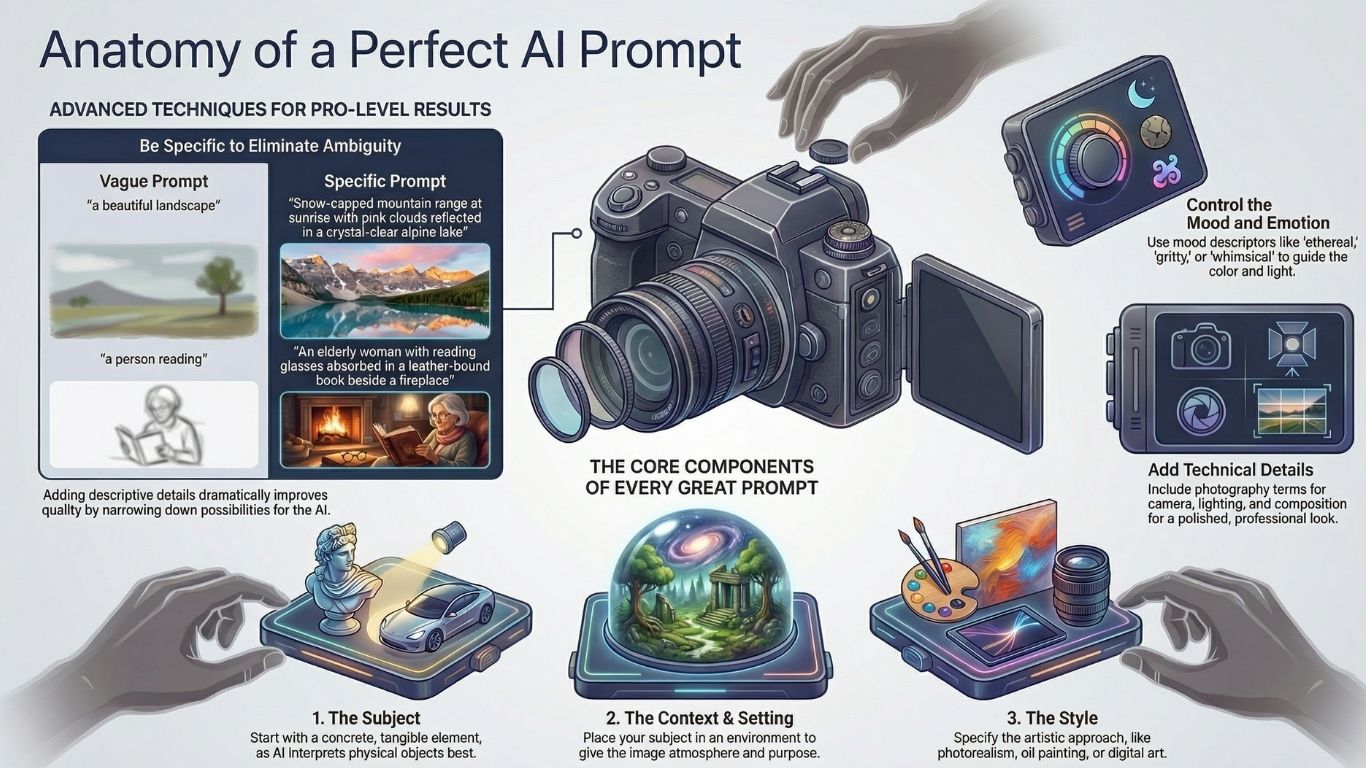
Every successful AI image prompt contains three fundamental elements that work together to guide the generation process toward your desired outcome. The subject forms the foundation and should always be a concrete, tangible element rather than abstract concepts since AI interprets physical objects more accurately than ideas like love or justice. Context and setting provide the environmental details that place your subject within a specific scene, atmosphere, or situation that makes the image feel complete and purposeful. Style specifications tell the AI whether you want photorealism, oil painting, watercolor, digital art, cartoon illustration, or any other artistic approach that matches your project needs. Additional modifiers like color palette, composition angle, and emotional tone add layers of refinement that elevate your results from acceptable to exceptional. Structuring your prompts with these components in a logical order helps the AI prioritize information correctly and produce more consistent results across multiple generation attempts.
The Power of Specificity
Specific details in your prompts dramatically improve output quality because they eliminate ambiguity and guide the AI toward precise interpretations of your vision. Instead of writing "beautiful landscape," try "snow-capped mountain range at sunrise with pink and orange clouds reflected in a crystal-clear alpine lake, pine forest in the foreground" to get remarkable improvements. Every descriptive word you add narrows down the billions of possible image variations until the AI focuses on exactly what you're envisioning. The difference between "a person reading" and "an elderly woman with silver hair and reading glasses absorbed in a leather-bound book beside a fireplace, warm amber glow illuminating her weathered hands" illustrates how specificity creates emotional depth and visual interest. Aim for at least six to eight descriptive keywords in your prompts, focusing on sensory details like textures, colors, lighting conditions, and spatial relationships that bring scenes to life.
Mastering Style and Mood
The stylistic direction you provide fundamentally changes how the AI interprets every other element in your prompt, making it one of the most powerful tools for creative control. You can reference specific artistic movements like impressionism, art deco, or cyberpunk, famous artists whose work inspires your vision, or technical styles like vintage photography or modern minimalism. Mood descriptors such as ethereal, gritty, whimsical, dramatic, or serene tell the AI what emotional response the image should evoke through color choices, lighting, and composition. Combining style references creates unique hybrid aesthetics that wouldn't exist in traditional art categories, like "Victorian steampunk meets Japanese minimalism with Art Nouveau flourishes" for truly original results. Remember that different AI platforms may interpret style keywords differently, so experimenting with various phrasings helps you learn which terms produce your preferred aesthetic on your chosen generator.

Technical Details That Transform Results
Including photography-specific terminology in your prompts helps AI generators produce images with professional visual qualities that feel authentic and polished. Specifying camera details like "shot with Canon EOS R5, 85mm lens at f/1.4" guides the AI to replicate realistic depth of field, bokeh effects, and perspective that match actual photography equipment. Lighting descriptions such as "golden hour lighting," "dramatic side lighting with deep shadows," or "soft diffused window light" control the mood and dimension in ways that vague terms like "good lighting" never could. Composition cues including "rule of thirds composition," "wide-angle establishing shot," "intimate close-up portrait," or "bird's eye view" position subjects within the frame with intentional artistic purpose. Color grading references like "warm cinematic tones," "high contrast black and white," or "desaturated with teal and orange color palette" give your images cohesive professional color treatment that elevates them beyond amateur snapshots.
Common Mistakes to Avoid
Using abstract concepts as your main subject consistently produces disappointing results because AI struggles to visualize intangible ideas like happiness, freedom, or infinity without concrete visual anchors. Overly long rambling prompts that include contradictory elements or excessive unnecessary details confuse the generator and often produce chaotic images that try to include everything but succeed at nothing. Being too vague with generic descriptors like "nice," "beautiful," or "good" leaves too much interpretation to chance and rarely delivers images that match what you actually envisioned. Forgetting to specify important details about composition, perspective, or framing can result in technically accurate subjects placed awkwardly within the image space. Expecting perfection on the first attempt sets you up for frustration since even professional prompt engineers typically generate multiple variations before achieving their ideal result.

Refining Your Prompts Through Iteration
The most successful AI image creators treat prompt writing as an iterative process where each generation informs improvements to the next attempt. Start with a core concept using basic subject and style information, then analyze what the AI produces to identify which elements need more specific direction. Add refinements one or two at a time rather than completely rewriting your prompt, which helps you understand exactly which changes improve your results. Keep notes about which descriptive terms and technical specifications work best for your preferred AI platform since different generators respond differently to similar language. Consider building a personal library of successful prompt templates that you can modify for new projects, saving time and ensuring consistent quality across your creative work.
Start Creating Professional AI Images
Mastering AI image prompts opens creative possibilities that were previously accessible only to skilled visual artists with years of technical training. The techniques covered in this guide will immediately improve your results, but remember that becoming truly proficient requires practice and experimentation with different approaches. Every AI-generated image teaches you something new about how to communicate more effectively with these powerful creative tools. ArtFly AI provides intuitive image generation capabilities that respond beautifully to well-crafted prompts, helping you bring your creative visions to life with minimal technical barriers. Start experimenting with detailed, specific prompts today and discover how quickly you can transform your ideas into stunning professional-quality visuals.
Watch Video Tutorial
Ready to Create?
Start using ArtFly AI today and bring your creative vision to life with powerful AI tools.
Get Started Free